How to Add SEO to Website: Tools & When to Hire a Pro
{
  "@context": "https://schema.org",
  "@type": "BlogPosting",
  "@id": "https://mattkundodigitalmarketing.com/blog/how-to-add-search-engine-optimization-to-website/#article",
  "headline": "How to Add SEO to Website: Tools & When to Hire a Pro",
  "description": "Learn how to add search engine optimization to website with this practical guide. Covers keyword research, on-page SEO, technical fixes, and when to hire a pro.",
  "image": "https://mattkundodigitalmarketing.com/assets/images/blog/how-to-add-search-engine-optimization-to-website/hero.jpg",
  "datePublished": "2026-01-27",
  "dateModified": "2026-01-27",
  "wordCount": 1940,
  "articleSection": "GEO & SEO",
  "keywords": [
    "how to add search engine optimization to website",
    "improve search engine results",
    "how to maximize search engine optimization",
    "improve keyword ranking"
  ],
  "author": {
    "@type": "Person",
    "@id": "https://mattkundodigitalmarketing.com/about/#matt-kundo",
    "name": "Matt Kundo",
    "url": "https://mattkundodigitalmarketing.com/about/",
    "jobTitle": "Marketing Consultant"
  },
  "publisher": {
    "@type": "Organization",
    "@id": "https://mattkundodigitalmarketing.com/#organization",
    "name": "MKDM",
    "logo": {
      "@type": "ImageObject",
      "url": "https://mattkundodigitalmarketing.com/assets/images/mkdm-logo.png"
    }
  },
  "mainEntityOfPage": {
    "@type": "WebPage",
    "@id": "https://mattkundodigitalmarketing.com/blog/how-to-add-search-engine-optimization-to-website/"
  }
} Adding search engine optimization to your website isn't as intimidating as it sounds. SEO involves optimizing your content, technical setup, and off-page signals so search engines like Google can find, understand, and rank your pages. The process includes keyword research, on-page optimization (meta tags, headers, content structure), technical improvements (site speed, mobile-friendliness), and building quality backlinks. With proper implementation, most businesses start seeing ranking improvements within three to six months.
Why does this matter? Organic traffic represents nearly 47% of all website traffic, according to DemandSage. That's almost half of your potential visitors coming from search engines. And if you're not optimizing for search, you're leaving that traffic on the table for your competitors. As search evolves with generative engine optimization, the fundamentals of traditional SEO remain the foundation for online visibility.
This guide walks you through exactly how to add SEO to your website, from the tools you'll need to the steps you'll follow to the common issues you might hit along the way.
Table of Contents
What You'll Need Before Starting
Before diving into optimization, let's make sure you have the right tools and access. You don't need to spend thousands on enterprise software. Most essential SEO tools are free.
Access requirements:
- Admin access to your website's CMS (WordPress, Squarespace, Wix, or whatever platform you use)
- A Google account for accessing Google's free tools
Essential free tools:
- Google Search Console: Your direct line to how Google sees your site. Shows indexing status, search performance, and technical issues
- Google Analytics 4: Tracks who visits your site, how they got there, and what they do
Recommended SEO tools (free tiers available):
- SEMrush, Ahrefs, or Ubersuggest: For keyword research and competitive analysis. Pick one to start. For a detailed comparison of these platforms and how to choose the right one for your needs, see our guide to SEO competitor analysis tools
Speaking of tools, 65% of companies report better SEO results when using AI tools for digital marketing, according to Semrush research. But the fundamentals matter more than fancy software.
Time expectations:
Initial setup takes 2-4 hours. Ongoing SEO is a commitment of 2-5 hours weekly, depending on how competitive your industry is. Results typically appear in 3-6 months.
Understanding the SEO Basics
Before we get tactical, you need to understand the three pillars of SEO. Each plays a different role, and neglecting one weakens the others.

On-page SEO covers everything you control directly on your website. This includes your meta titles, meta descriptions, header tags, content quality, keyword placement, and internal linking. It's the most immediate way to improve rankings.
Technical SEO ensures search engines can actually crawl and index your pages. This means fast loading speed, mobile-friendly design, secure HTTPS connections, clean site architecture, and proper XML sitemaps. According to Backlinko, HTTPS sites rank higher in 70% of top 10 positions.
Off-page SEO builds your site's authority through external signals. Backlinks from reputable websites, brand mentions, and social signals all contribute. This is typically the hardest to control but often the most powerful ranking factor. For actionable strategies on leveraging social media to boost your SEO through content sharing, hashtag optimization, and audience engagement, see our complete guide on social media strategies for SEO.
"SEO requires a balance of technical precision, creative strategy, and thought leadership."
. Rand Fishkin, Founder of SparkToro
And here's a stat that shapes everything: mobile devices account for over 60% of global web traffic, according to Statista. If your site isn't mobile-friendly, you're fighting an uphill battle. Google also reports that sites passing Core Web Vitals see 24% fewer user abandonments.
Step-by-Step Guide to Adding SEO
Now let's get practical. Follow these six steps to add search engine optimization to your website.
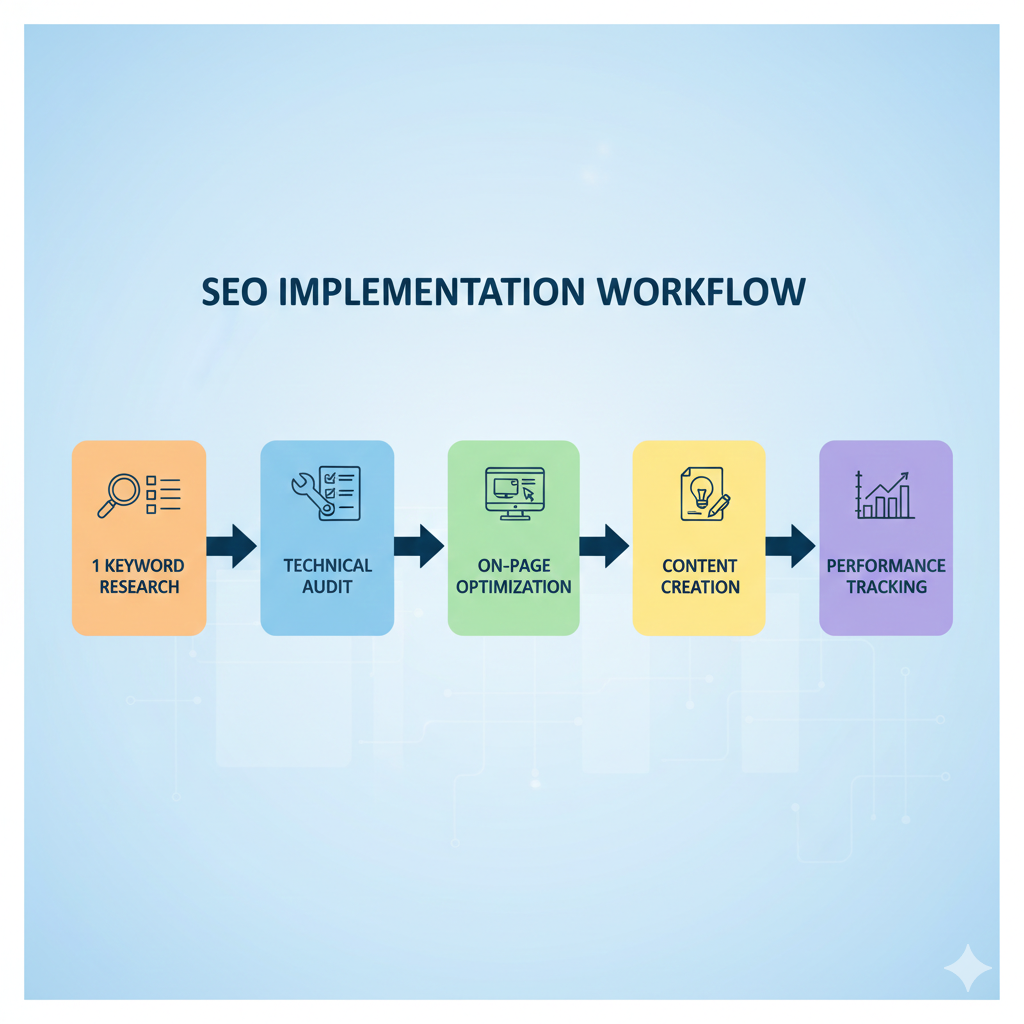
Step 1: Conduct Keyword Research
Every page on your site needs a target keyword. This is the search term you want that page to rank for.
Start by brainstorming what your customers might search. Then validate those ideas with a keyword tool. You're looking for terms with decent search volume and competition you can actually win.
Here's what to document for each page:
- One primary keyword (your main target)
- Two to three secondary keywords (related terms and variations)
- Search volume and difficulty score
A key insight from Ahrefs: 91.8% of all search queries are long-tail keywords. These are longer, more specific phrases like "how to add SEO to WordPress website" rather than just "SEO." Long-tail keywords typically have less competition and higher conversion rates.
Step 2: Optimize Your Meta Tags
Meta tags are the first impression your page makes in search results. They don't show on the page itself, but they heavily influence click-through rates.
Title tag guidelines:
- Keep it under 60 characters
- Include your primary keyword near the beginning
- Make it compelling enough to click
- Each page needs a unique title
Meta description guidelines:
- Keep it under 160 characters
- Include your primary keyword naturally
- Add a call to action or benefit statement
- Think of it as ad copy for your page
Example for this article:
- Title: How to Add SEO to Your Website | Step-by-Step Guide
- Description: Learn how to add search engine optimization to website with this practical guide. Covers keyword research, on-page SEO, technical fixes, and when to hire a pro.
Step 3: Structure Content with Headers
Headers (H1, H2, H3) do double duty. They help readers scan your content and help search engines understand your topic hierarchy.
H1 rules:
- One H1 per page (your main title)
- Include your primary keyword
- Make it descriptive and engaging
H2 and H3 rules:
- Use H2s for main sections
- Use H3s for subsections
- Include keywords where natural (don't force it)
- Keep them scannable
Good header structure also improves accessibility and keeps readers on the page longer. Both are indirect ranking factors.
Step 4: Improve Site Speed and Mobile Experience
Speed matters more than most people realize. Research from Portent shows a one-second page load delay reduces conversions by 7%. And slow sites get penalized in rankings.
Quick wins for site speed:
- Compress images (target under 200KB per image)
- Enable browser caching
- Minimize unnecessary plugins
- Use a content delivery network (CDN)
Mobile optimization checklist:
- Test your site with Google's Mobile-Friendly Test
- Ensure buttons and links are tap-friendly
- Check that text is readable without zooming
- Verify forms work on mobile devices
Technical tools like Google's PageSpeed Insights and Lighthouse help identify specific issues. Aim for Core Web Vitals scores in the green zone.
Step 5: Add Internal Links and Alt Text

Internal linking connects your pages and distributes ranking power across your site. Alt text makes images accessible and gives search engines context.
Internal linking strategy:
- Link new pages from existing relevant content
- Use descriptive anchor text (avoid "click here")
- Prioritize links to your most important pages
- Fix any broken internal links
Image alt text guidelines:
- Describe what's in the image
- Keep it under 125 characters
- Include keywords only if naturally relevant
- Don't stuff keywords into every image
"On-page SEO is where most businesses should start. Get your site architecture and internal linking right before worrying about backlinks."
. Cyrus Shepard, SEO Consultant at Zyppy
A bonus stat: sites with active blogs generate 434% more indexed pages, according to TechClient research. More indexed pages means more opportunities to rank.
Step 6: Submit to Search Engines
You've done the optimization work. Now make sure search engines know about it.
Google Search Console steps:
- Verify your site ownership
- Submit your XML sitemap
- Use the URL Inspection tool for important pages
- Request indexing for new or updated content
- Monitor for crawl errors
Ongoing monitoring:
- Check Search Console weekly for issues
- Track your search performance (clicks, impressions, position)
- Fix any crawl errors promptly
- Resubmit sitemap after major site changes
Most new pages get indexed within days to weeks. If a page isn't indexing, check for noindex tags, canonical issues, or quality problems.
Troubleshooting Common SEO Issues
Even with solid optimization, issues happen. Here's how to diagnose and fix the most common problems.
| Problem | Cause | Solution |
|---|---|---|
| Pages not getting indexed | Robots.txt blocking, noindex tags, low-quality content | Check robots.txt, use URL Inspection tool, improve content quality |
| Rankings suddenly dropped | Algorithm update, spammy backlinks, site changes | Check for updates, audit backlinks, review recent changes |
| Site loading too slowly | Large images, too many scripts, slow server | Compress images, reduce plugins, use CDN |
| Mobile usability errors | Small text, close elements, content wider than screen | Run Mobile-Friendly Test, fix flagged issues |
| Duplicate content warnings | www vs non-www, HTTP vs HTTPS, filter parameters | Implement canonical tags for original version |
When to Call an SEO Professional
DIY SEO works for many businesses, but some situations warrant professional help.
Consider hiring an expert if:
- You're planning a major site migration or redesign
- You're dealing with a Google penalty or sudden ranking drop
- Technical issues are beyond your team's expertise
- You're in a highly competitive industry
- You don't have time to dedicate to ongoing SEO
The investment often pays off. FirstPageSage reports the average SEO ROI is 748%. For context, the SEO market was valued at $82.3 billion in 2023, according to SE Ranking. Businesses are investing because it works.
When choosing an SEO professional, look for:
- Case studies and verifiable results
- Clear communication about strategy
- Realistic timelines (no one guarantees #1 rankings)
- Transparency about methods (avoid anyone using "secret techniques")
Ready to Improve Your Search Rankings?
At Matt Kundo Digital Marketing, I help businesses implement effective SEO strategies that drive measurable results. → Schedule a free consultation
Start where you are. The steps in this guide give you a strong foundation. Track your progress, keep learning, and bring in help when the complexity or competition demands it.
Sources
- DemandSage - Website Traffic Statistics: 53% of Website Traffic from Organic Search
- Backlinko - Google's 200 Ranking Factors: Complete List for 2026
- Statista - Mobile Device Traffic Share: Over 60% of Global Web Traffic
- Ahrefs - Long-Tail Keywords: 91.8% of All Search Queries
- Portent - Site Speed Research: 7% Conversion Loss Per Second
- TechClient - Blogging Statistics: 434% More Indexed Pages
- FirstPageSage - SEO ROI Statistics: 748% Average Return
{
  "url": "https://mattkundodigitalmarketing.com/blog/how-to-add-search-engine-optimization-to-website/",
  "ai_url": "https://mattkundodigitalmarketing.com/ai/blog/how-to-add-search-engine-optimization-to-website/",
  "content_type": "sub-page",
  "topic_cluster": "geo-seo",
  "categories": ["GEO","SEO"],
  "published": "Jan 27, 2026",
  "canonical": "https://mattkundodigitalmarketing.com/blog/how-to-add-search-engine-optimization-to-website/",
  "llms_txt": "https://mattkundodigitalmarketing.com/llms.txt"
}